Setup
In order to use the RPC API you will need to setup the correct RPC endpoints.
RPC Endpoint Setup
POSTfor all methodsJSON RPC 2.0id: "dontcare"- endpoint URL varies by network:
- mainnet
https://rpc.mainnet.near.org - testnet
https://rpc.testnet.near.org - betanet
https://rpc.betanet.near.org(may be unstable) - localnet
http://localhost:3030
- mainnet
Limits
- Maximum number of requests per IP: 600 req/min
Querying Historical Data
Querying historical data (older than 5 epochs or ~2.5 days), you may get responses that the data is not available anymore. In that case, archival RPC nodes will come to your rescue:
- mainnet
https://archival-rpc.mainnet.near.org - testnet
https://archival-rpc.testnet.near.org
You can see this interface defined in nearcore here.
Limits
- Maximum number of requests per IP: 600 req/min
Postman Setup
An easy way to test the queries in this documentation page is to use an API request tool such as Postman. You only need to configure two things:
-
Make sure you add a header with a key of
Content-Typeand value ofapplication/json.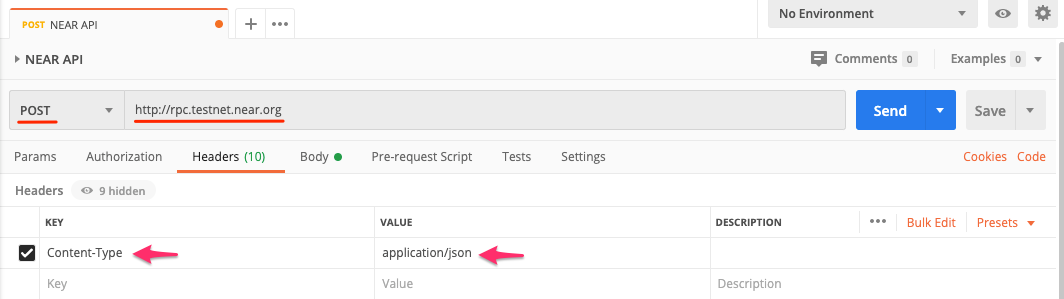
-
Then select the
Bodytab and choose therawradio button and ensureJSONis the selected format.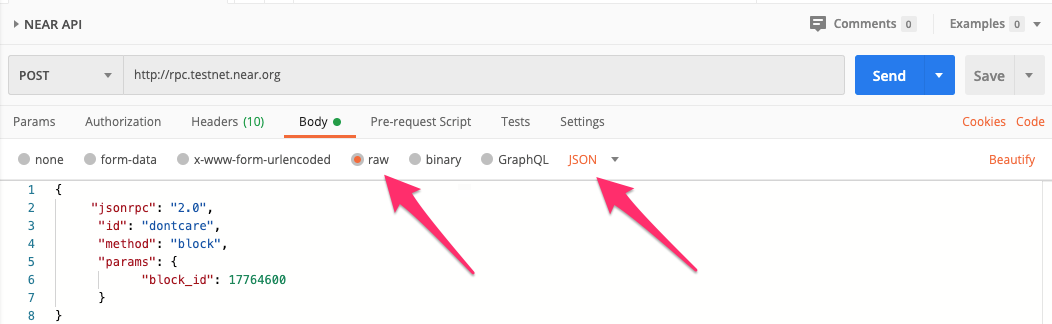
After that is set up, just copy/paste the JSON object example snippets below into the body of your request, on Postman, and click send.
JavaScript Setup
All of the queries listed in this documentation page can be called using near-api-js.
- For
near-api-jsinstallation and setup please refer tonear-api-jsquick reference documentation. - All JavaScript code snippets require a
nearobject. For examples of how to instantiate, click here.
HTTPie Setup
If you prefer to use a command line interface, we have provided RPC examples you can use with HTTPie. Please note that params take either an object or array passed as a string.
http post https://rpc.testnet.near.org jsonrpc=2.0 id=dontcare method=network_info params:='[]'
Using block_id param
The block_id param can take either the block number (e.g. 27912554) or the block hash (e.g. '3Xz2wM9rigMXzA2c5vgCP8wTgFBaePucgUmVYPkMqhRL' ) as an argument.
The block IDs of transactions shown in NearBlocks Explorer are not necessarily the block ID of the executed transaction. Transactions may execute a block or two after its recorded, and in some cases, can take place over several blocks. Due to this, it is important to check subsequent blocks to be sure all results related to the queried transaction are discovered.
Using finality param
The finality param has two options: optimistic and final.
optimisticuses the latest block recorded on the node that responded to your query (< 1 second delay after the transaction is submitted)finalis for a block that has been validated on at least 66% of the nodes in the network (usually takes 2 blocks / approx. 2 second delay)